Check old plugins for HPOS before an update breaks the store
HPOS moved orders out of the posts table. Old plugins that read orders as posts fail without an error. How to find them and what a fix involves.
A plugin that has worked for four years now saves nothing. The order notes it wrote are gone, the custom field it added to the order screen is empty, and there has been no error. The plugin reads orders with get_post_meta(). The store moved to High-Performance Order Storage during an update, and orders are no longer posts.
That is what an HPOS failure looks like. Not a white screen. A feature that silently does nothing.
TLDR
HPOS moves orders out of the posts table into their own tables, and any code that reads or writes orders through post functions stops working without an error. Check the Features screen for the list of incompatible plugins, keep compatibility sync on until each one is fixed, and treat the fix as a code change, not a setting.
What changed
Since WooCommerce began, an order was a post of type shop_order, with every field in postmeta. That worked, and it also meant every order lookup joined a table holding every post, page, product and revision on the site. High-Performance Order Storage gives orders their own tables with columns for the fields orders actually have. Order pages load faster, and reports stop timing out on large stores.
It became the default for new stores in WooCommerce 8.2, in October 2023. Existing stores were not switched automatically, which is why it still surprises people: the switch happens when someone turns it on, or when a host or an agency does it as part of an update.
How code breaks
Any code that treats an order as a post. The patterns are the same across old plugins and old snippets:
get_post_meta( $order_id, ... )andupdate_post_meta( $order_id, ... )to read and write order fields.get_posts()orWP_Querywithpost_type => 'shop_order'to find orders.- Hooks on
save_postortransition_post_statusto react to order changes. - Direct SQL against
wp_postsandwp_postmetafiltered by order type.
With HPOS on, those reads return nothing and those writes go to a post that is not the order. No exception, because the functions succeed. They just operate on the wrong table.
The fixed version goes through the order object. wc_get_order( $order_id ) returns it from whichever table is in use, $order->get_meta() and $order->update_meta_data() handle fields, and wc_get_orders() replaces the post queries. The hooks become woocommerce_update_order and the status transition hooks WooCommerce provides.
A plugin that has been updated declares it, once, on load:
use Automattic\WooCommerce\Utilities\FeaturesUtil;

add_action( 'before_woocommerce_init', function () {
    if ( class_exists( FeaturesUtil::class ) ) {
        FeaturesUtil::declare_compatibility( 'custom_order_tables', __FILE__, true );
    }
} );
That declaration is what the Features screen reads.
Find the ones that will break
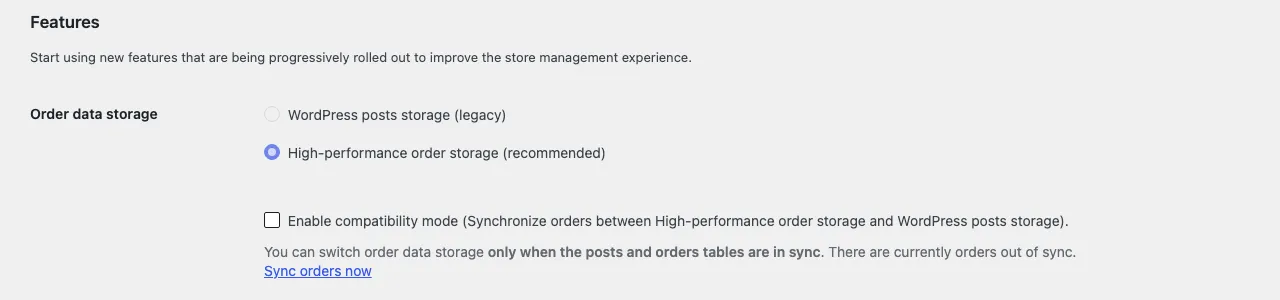
WooCommerce, then Settings, then Advanced, then Features. Under order data storage, a “View and manage” link opens the list of active plugins that have not declared HPOS compatibility, at plugins.php?plugin_status=incompatible_with_feature&feature_id=custom_order_tables. That list is the audit.
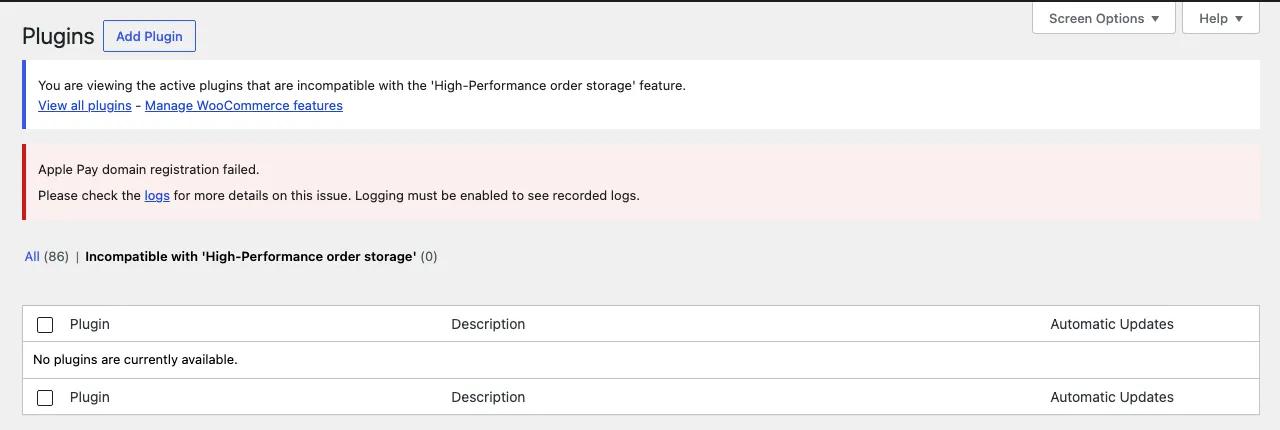
Snippets are the harder half. Code in functions.php or a snippets plugin does not appear on that list, and old checkout customizations are exactly the kind of code that touches order meta. Search the theme and the snippets for get_post_meta and shop_order and read each hit.
The patterns and their replacements
Most fixes are mechanical once you know the mapping. The left column is what old code does; the right column is what works on both storage modes, because the order object hides which table is underneath.
| Old pattern | Replacement | Note |
|---|---|---|
get_post_meta( $order_id, '_key', true ) |
wc_get_order( $order_id )->get_meta( '_key' ) |
get_meta() reads from whichever table is authoritative |
update_post_meta( $order_id, '_key', $v ) |
$order->update_meta_data( '_key', $v ); $order->save(); |
The save() is the part people forget, and without it nothing is written |
get_posts( array( 'post_type' => 'shop_order' ) ) |
wc_get_orders( array( 'status' => 'processing', 'limit' => 50 ) ) |
wc_get_orders() takes the same kind of arguments and returns order objects |
$post->post_status on an order |
$order->get_status() |
Statuses drop the wc- prefix on the object |
get_post( $order_id )->post_date |
$order->get_date_created() |
Returns a date object with timezone handling |
add_action( 'save_post_shop_order', ... ) |
add_action( 'woocommerce_update_order', ... ) |
Fires for both storage modes |
$_GET['post'] on the edit screen |
$_GET['id'] on the HPOS screen, or wc_get_order( absint( $_GET['id'] ?? $_GET['post'] ?? 0 ) ) |
The HPOS admin screen is a different page with a different query string |
Direct SQL on wp_postmeta |
wc_get_orders() with a meta_query, or the wc_orders_meta table if SQL is unavoidable |
Direct SQL is the one that needs a rewrite rather than a substitution |
The admin screen row catches plugins that add a metabox or a column to the order list. The HPOS order screen lives at admin.php?page=wc-orders rather than edit.php?post_type=shop_order, and the hooks that add metaboxes take the screen id from wc_get_page_screen_id( 'shop-order' ) rather than the string shop_order. A metabox registered with the old string simply does not appear.
Testing on staging with the CLI
WooCommerce ships a set of WP-CLI commands under wp wc hpos that make this testable without clicking through the admin. The ones that matter for an audit, run on a staging copy:
wp wc hpos status
wp wc hpos count_unmigrated
wp wc hpos sync
wp wc hpos verify_data
wp wc hpos enable
status prints whether HPOS is on, whether compatibility mode is on, and how many orders are unsynced. On a store that switched storage at some point, count_unmigrated and verify_data tell you whether the two tables agree, which is the first thing to know before turning compatibility mode off. sync brings them into line. enable and disable switch the authoritative table, and enable refuses if the tables are out of sync, which is the safety rail.
The test for a plugin is then: on staging, wp wc hpos enable, turn compatibility mode off, place an order that exercises the plugin, and check whether the plugin’s data arrived. Then read the plugin’s code for the patterns in the table above, fix them, and place the order again. A plugin that passes with compatibility mode off is fixed. A plugin that only passes with it on is not.
For a store that has never switched, the safest order of operations is: run the audit on staging, fix or replace every plugin on the incompatible list, switch staging to HPOS with compatibility mode on, run a week of real order flow through it, turn compatibility mode off, and only then do the same on the live store. The two-table period is the insurance. Keep it short and then end it.
What the store gets for the trouble
The reason to finish the switch rather than live in compatibility mode is what HPOS does for a store with real order volume. The orders list in the admin stops joining against every post on the site. Searching orders by customer, email or product uses indexed columns instead of a meta table scan. Reports and exports that timed out on 200,000 orders finish. Plugins that write to orders write to a table designed for orders, and the wp_postmeta table stops being the biggest table in the database.
There is also a cleanup at the end. Once compatibility mode is off and verify_data reports no differences, wp wc hpos cleanup removes the duplicate order data still sitting in the posts and postmeta tables from the sync period. On a store that ran with compatibility mode on for a year, that is often gigabytes, and the backup gets smaller the same day.
None of that is visible to a customer. All of it is visible to whoever runs the store at eight on a Monday morning with 400 orders to process.
Compatibility mode buys time, not a fix
The same screen has a checkbox named “Enable compatibility mode (synchronizes orders to the posts table)” that keeps the posts table and the HPOS tables both current. With it on, old code reading from posts still finds the data, at the cost of every order write happening twice. Stores use it as a bridge while plugins get fixed. Stores that leave it on for a year have doubled their order write load and are still one plugin update from a silent failure, because the old plugin never got fixed.
The fix for a plugin someone else wrote is a code change: replace the post functions with order functions, add the declaration, test on a store with HPOS on and sync off. For a small plugin or a snippet that is a day. For a plugin that reaches into orders in twenty places it is a feature sprint, and sometimes the answer is that the plugin is abandoned and should be replaced.
If the Features screen shows a list and you are not sure which of those plugins matter, that is what our WooCommerce development page calls rewrites and HPOS fixes. The first step is a two-day code review that names the cost of each one.
Questions
Is HPOS on for my store?
WooCommerce, then Settings, then Advanced, then Features. The order data storage setting says which table orders live in. Stores created after October 2023 default to HPOS; older stores kept posts unless someone switched.
Can I switch back?
Yes, from the same screen, as long as the sync option has kept both tables current. Switching back is a stopgap while a plugin is fixed, not a fix.
Read these next
Same kind of problem, different corner of the store.

Block theme or page builder for a new WooCommerce store
Page builders are how most WooCommerce stores got slow. A block theme keeps the layout in the editor WordPress already has. Where each one wins.
WooCommerce
Add custom fields to the WooCommerce block checkout
The old checkout field filters do nothing on the block checkout. The Additional Checkout Fields API does. Code, limits, and when to go further.
WooCommerce
Measure a slow WooCommerce store before you buy a plugin
A caching plugin speeds up the home page and leaves the cart and checkout as slow as before. What to measure, and the five causes that come up most.
WooCommerce