Add custom fields to the WooCommerce block checkout
The old checkout field filters do nothing on the block checkout. The Additional Checkout Fields API does. Code, limits, and when to go further.

The snippet that added a delivery date field to the WooCommerce checkout for six years stopped working the day a store switched to the block checkout, and it stopped without a message. The field disappeared. The woocommerce_checkout_fields filter it used still runs. It just runs for a checkout page the store no longer shows.
If your checkout is the block version, which every new WooCommerce store has had since 8.3, the old way of adding a field is not deprecated. It is irrelevant. The block checkout is a React application that reads its fields from a different place.
TLDR
On the block checkout, add fields with
woocommerce_register_additional_checkout_field()on thewoocommerce_inithook. Fields go in the contact, address or order section, support text, select and checkbox types, validate on the server, and land in the order, the confirmation email and the admin order screen. Anything the API does not support, such as a date picker or a field that changes the price, is a small plugin with a JavaScript block.
Why the old filters stopped working
The classic checkout is a PHP template. woocommerce_checkout_fields edits the array the template loops over, and every checkout customization since 2012 hooked into it. The block checkout is rendered in the browser from the Store API. The PHP array never reaches it.
The tell is in the page. Open the checkout page in the editor: if it holds a Checkout block, the filters are dead. If it holds the [woocommerce_checkout] shortcode, they work. Stores that upgraded from an old install often still have the shortcode. Stores set up after late 2023 have the block.
There is a second half to the breakage. Snippets that added a field usually had a companion that saved it, hooked to woocommerce_checkout_update_order_meta, and a third that showed it in the admin. All three are classic-only. A field that appears through some other route but never saves is worse than no field.
The supported way
WooCommerce shipped the Additional Checkout Fields API in 8.7, in early 2024. It is one function, called at the right time, and it handles rendering, validation, saving and display. Everything below was run on WooCommerce 11.1 with the block checkout before publishing.
A delivery instructions field and a PO number field for a B2B store:
add_action( 'woocommerce_init', function () {
    if ( ! function_exists( 'woocommerce_register_additional_checkout_field' ) ) {
        return;
    }

    woocommerce_register_additional_checkout_field( array(
        'id'       => 'acme/po-number',
        'label'    => 'Purchase order number',
        'location' => 'order',
        'type'     => 'text',
        'required' => false,
    ) );

    woocommerce_register_additional_checkout_field( array(
        'id'       => 'acme/delivery-instructions',
        'label'    => 'Delivery instructions',
        'location' => 'address',
        'type'     => 'text',
        'required' => false,
    ) );
} );
Three things to get right, because each one has caught a store we have worked with.
The hook is woocommerce_init, not init and not plugins_loaded. Register earlier and the function does not exist yet. The function_exists check keeps the site up if WooCommerce is deactivated.
The id has a namespace before the slash. It is stored under that key, so acme/po-number and a plugin’s otherplugin/po-number do not collide. The namespace is yours; pick one and keep it.
The location decides where the field appears and how often. contact sits with the email, once. address appears in both billing and shipping and is saved to each. order sits at the end, once, and is the right place for anything about the order rather than the person.
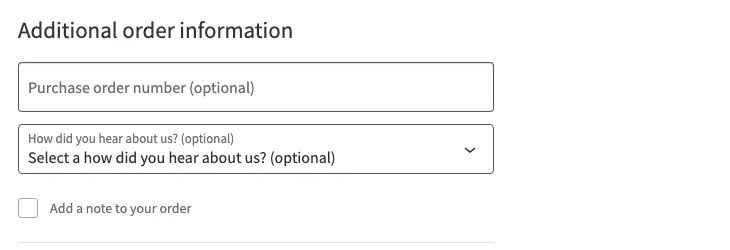
Types are text, select and checkbox, and the source lists exactly those three. A select takes an options array. A checkbox that is required forces the customer to check it, which is how you do “I confirm I am over 18” without a plugin.
Reading the value back
The field saves to the order automatically. In a template, an email or a fulfillment integration, read it from the order object:
$po = $order->get_meta( '_wc_other/acme/po-number' );The prefix depends on the location: _wc_other/ for order and contact fields, _wc_billing/ and _wc_shipping/ for address fields, which are saved once for each address. An older _wc_additional/ prefix was deprecated in 8.9 in favor of _wc_other/, so ignore snippets that use it. This is also what to give the person building the ERP sync, because the PO number is the field the accounting system will ask for on every invoice.
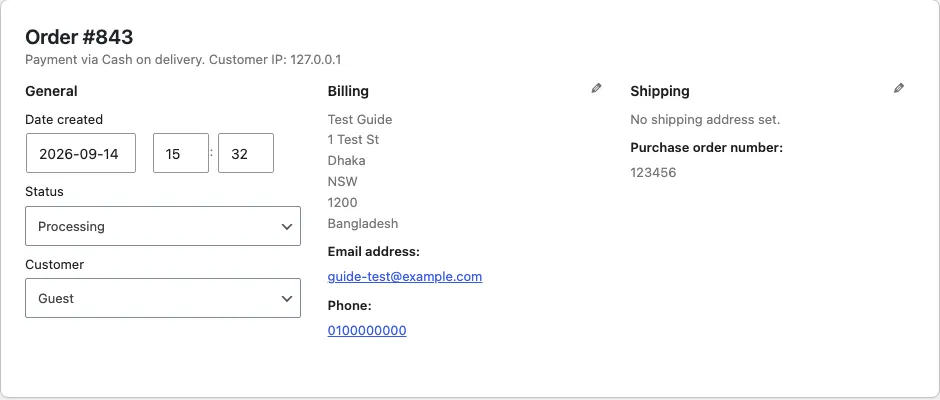
The value shows in the admin order screen under the section it was registered in, and in the customer’s order confirmation email, with no extra code. Placing an order through the Store API on a WooCommerce 11.1 test store with 123456 in the field created the order with exactly one new meta key, _wc_other/acme/po-number, holding that value.
Validation and conditions
Server-side validation hooks into woocommerce_validate_additional_field, which receives the error object, the field id and the value. A PO number that has to be six digits:
add_action( 'woocommerce_validate_additional_field', function ( WP_Error $errors, $field_key, $field_value ) {
    if ( 'acme/po-number' === $field_key && '' !== $field_value && ! preg_match( '/^\d{6}$/', $field_value ) ) {
        $errors->add( 'po_number_format', 'The purchase order number is six digits.' );
    }
}, 10, 3 );
The error shows against the field at checkout. Because it runs on the server, it also runs for orders placed through the Store API from an app or a headless front end, which is the reason to validate here and not only in the browser. Posting a checkout to the Store API with 12ab in that field returns a 400 with the message above under additional_fields, which is what the block checkout displays.
Conditional display arrived in WooCommerce 9.9. The required and hidden options accept rules instead of a boolean, and the rules are evaluated against the cart, the customer and the other checkout fields.
The developer docs have a tutorial on conditional fields with the rule syntax. The document the rules read has three parts: cart.* with the total, the items and whether the order needs shipping, customer.* with the addresses and contact-location fields, and checkout.* with the payment method and order-location fields. A PO number that is required only when the cart total is over a threshold, or a company field hidden unless the customer checked a “buying for a business” checkbox, is a rule and no longer code.
The tutorial’s warning is worth repeating: the path to another field depends on that field’s location. Address-location values are not under additional_fields, and a rule that points at the wrong path fails silently. A condition on something outside the document, like a product category in the cart, still needs code: register the field always and validate it only when the condition applies, or write a small checkout block that reads the cart and shows the field itself.
When the API is not enough
Four cases from real quotes.
A date picker for delivery date. The API has no date type. The workaround is a text field with server validation for the format, which is what most stores accept. A real calendar with blocked days is a custom inner block for the checkout, written in JavaScript with @woocommerce/blocks-checkout, plus the same server validation.
A file upload for a prescription, a license or a design. No file type in the API and no plan for one. This is a custom block that uploads to the media library through the REST API before the order is placed, stores the attachment ID in an additional field, and shows the file on the admin order. About a week of work, and it is one of the checkout jobs we build most often.
A field that changes the price. Gift wrapping for $3, a rush fee, a deposit option. The field is easy; the fee is a woocommerce_cart_calculate_fees hook that reads the field’s value from the checkout data as the customer types. The block checkout sends field values to the server on change, so the fee updates live. The plumbing is fiddly and worth doing once, properly.
VAT number validation for EU B2B. A text field, validation against the VIES service on the server, and a tax exemption set on the customer when it passes. The field is ten lines. The VIES call and the tax logic are the work, and they belong with the store’s tax setup rather than in a checkout snippet.
Plugins, and when to skip them
Checkout Field Editor and the ThemeHigh version give a settings screen for the same API, which is right for a store owner who wants to add a text field without a developer. Their block checkout support arrived later than their classic support, so check the version. For a text or select field with no logic, buy the plugin and stop reading.
Skip the plugin when the field has logic: a condition, a price, a file, a date, or a downstream system that needs the value in a specific place. Each of those is a few days of code in a plugin of your own, and the code is the whole feature rather than a settings screen plus a snippet plus a workaround.
Moving a classic snippet across
The order of work for a store with old checkout snippets:
- List every snippet that touches checkout fields, in the theme, in a snippets plugin and in any custom plugin. Search for
woocommerce_checkout_fields,woocommerce_checkout_update_order_metaandwoocommerce_admin_order_data_after_billing_address. - For each field, decide the location and type under the new API. Most map directly.
- Register the fields on a staging copy with the block checkout, place a test order, and check the order screen and the email.
- Update anything that reads the old meta key. The old key was whatever the snippet chose; the new one has the location prefix.
- Remove the old snippets. Leaving them in place does no harm today and confuses the next developer.
A store with three or four fields is a day. A store with a checkout that grew for six years is a feature sprint, and the snippet that added a delivery date in 2019 finally gets a calendar.
Questions
Does the Checkout Field Editor plugin work with the block checkout?
The newer versions register fields through the same Additional Checkout Fields API, so they show. The classic-only versions do not. Check the plugin's changelog for block checkout support before assuming.
Can I switch back to the classic checkout?
Yes. Replace the Checkout block with the [woocommerce_checkout] shortcode on the checkout page and the old filters work again. You lose the block checkout's express payments, address autocompletion and faster load. It is a stopgap, not a plan.
Read these next
Same kind of problem, different corner of the store.

Block theme or page builder for a new WooCommerce store
Page builders are how most WooCommerce stores got slow. A block theme keeps the layout in the editor WordPress already has. Where each one wins.
WooCommerce
Check old plugins for HPOS before an update breaks the store
HPOS moved orders out of the posts table. Old plugins that read orders as posts fail without an error. How to find them and what a fix involves.
WooCommerce
Measure a slow WooCommerce store before you buy a plugin
A caching plugin speeds up the home page and leaves the cart and checkout as slow as before. What to measure, and the five causes that come up most.
WooCommerce