Move subscriptions to WooCommerce without losing saved cards
Whether the cards follow depends on who holds them. Stripe, Braintree and Authorize.net release tokens. Shopify Payments does not.

The question a subscription merchant asks first is the right one: will my customers have to enter their card again? The answer depends on one thing, and it is not the platform you are leaving. It is which company holds the card.
If the cards sit with Stripe, Braintree or Authorize.net, they can follow the subscriptions to WooCommerce and the next renewal charges as if nothing happened. If they sit with Shopify Payments, they cannot leave, and the migration plan has to include getting a new card from every subscriber before their next renewal.
TLDR
Subscription records move with a CSV and the free WooCommerce Subscriptions importer. Saved cards move only when the processor releases the tokens, which Stripe, Braintree and Authorize.net do and Shopify Payments does not. For Shopify Payments subscribers, import the subscriptions without a payment method and send a one-click update link before the next renewal date.
Two migrations in one
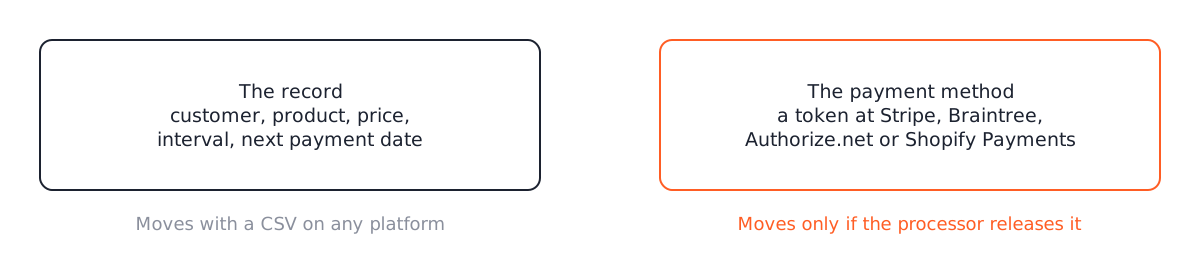
A subscription is two things. There is the record: the customer, the product, the price, the interval, the next payment date, the status. And there is the payment method: a token at a card processor that lets the store charge the card without seeing the number.
The record is easy. Recharge, Bold, Stripe Billing and WooCommerce Subscriptions all export subscriptions as CSV. The WooCommerce Subscriptions importer and exporter reads a CSV and creates the subscriptions with their dates intact, and the WooCommerce guide to migrating subscribers walks through the columns.
The payment method is where migrations fail. The token is only useful to the processor that issued it, so a subscription imported without a valid token for a gateway the new store uses is a subscription that will fail its next renewal.
When the cards follow
The clean case is the same processor on both sides. A Recharge store that used Stripe as the gateway has a Stripe customer ID and a payment method ID for every subscriber. Those same IDs work from WooCommerce with the Stripe extension. The CSV carries them in the payment meta column, and the importer attaches them:
payment_method,payment_method_post_meta
stripe,"_stripe_customer_id: cus_ABC123 | _stripe_source_id: pm_XYZ789"
Same for Braintree and Authorize.net, with their own meta keys. If the old and new stores use different Stripe accounts, Stripe can copy the payment methods between accounts on request. It takes a support ticket and a few days.
Two WooCommerce sites on the same Stripe account is the easiest migration there is. Export, import, done, and the renewals never notice.
When the cards cannot follow
Shopify Payments will not release card tokens to any other processor. Merchants have asked for years; the answer has not changed. Recharge or Bold on a Shopify store using Shopify Payments means the cards stay behind when you leave.
The plan for those subscribers is a communication plan with a technical floor under it:
- Import every subscription with its dates and products, but with no payment method, so it shows as needing a payment method on the new store.
- Enable payment method switching in WooCommerce Subscriptions, so a customer can add a card from their account page in one step.
- Email every affected subscriber before their next renewal date with a link that lands on that page, and send a second email three days before the date to anyone who has not added a card.
- Set the failed-renewal retry rules so a subscription that misses a payment is retried and held rather than canceled.
Expect some churn. Stores that send the first email early and keep the update page to one screen lose a few percent, in our experience. Stores that let subscribers discover the problem through a failed payment lose a lot more.
Switch day
Renewals must not run twice. The switch happens in this order: pause renewals on the old system, export the final CSV, import to the new store on staging, spot check the subscriptions due in the next seven days against the export, go live, resume renewals on the new store, and cancel the old subscriptions only after the first week of renewals has charged correctly.
Pick the day by looking at the renewal calendar. Most stores have a cluster around the 1st because that is when people signed up. Move in the quietest week.
The CSV, column by column
The importer’s sample file has around forty columns, and most migrations use fewer than twenty. The ones that matter, from the sample CSV that ships with the importer:
| Column | What goes in it | Note |
|---|---|---|
customer_email |
The subscriber’s email | The importer matches or creates the customer from this; customer_id and customer_username are alternatives |
subscription_status |
active, on-hold, cancelled, pending-cancel |
Import paused subscriptions as on-hold and resume them after the check |
start_date, next_payment_date, end_date, trial_end_date |
Dates in Y-m-d H:i:s, UTC |
next_payment_date is the one that must be right. Everything else is history |
billing_period, billing_interval |
month and 1 for monthly, week and 2 for every two weeks |
Matches the product’s own schedule or the importer complains |
order_total, order_shipping, order_tax, order_currency |
The renewal amount and its parts | This is what the next renewal charges, so it is the second thing to verify |
payment_method |
The gateway id, such as stripe |
Must be a gateway active on the new store |
payment_method_post_meta |
The gateway’s token meta, as key: value pairs separated by | |
The whole reason the migration works or does not |
payment_method_user_meta |
Same format, for gateways that store the token on the user rather than the subscription | Rare; check the gateway |
order_items |
The subscription’s products, with quantities and totals | One product per subscription keeps this simple |
| Billing and shipping columns | Name, address, phone | Copied from the export |
The importer reads payment_method_post_meta by splitting on the pipe and then on the colon, so the format is exactly _stripe_customer_id: cus_ABC123 | _stripe_source_id: pm_XYZ789. Those two meta keys are the ones the WooCommerce Stripe gateway writes on a subscription when a customer pays, which is what makes an imported subscription indistinguishable from one created at checkout. Braintree and Authorize.net have their own pair; the WooCommerce guide to migrating subscribers lists them by gateway.
Gateway by gateway
Stripe to Stripe. The clean case. Same Stripe account on both sides means the customer and payment method IDs are already valid; different accounts means asking Stripe to copy payment methods between them first, which they do through a support request and a few days’ wait. Then the IDs in the CSV are the new account’s.
Braintree and Authorize.net. Both hold cards in a vault that belongs to the merchant, both have an export path, and both have a WooCommerce gateway that supports subscriptions. The token meta keys differ from Stripe’s, and the mapping is done once for the whole file.
PayPal. Subscriptions billed through PayPal reference transactions can move between WooCommerce sites on the same PayPal account, and cannot move anywhere else. Subscriptions billed through a PayPal subscription button on another platform need the customer to set up a new agreement. Treat PayPal subscribers like Shopify Payments subscribers: import without a payment method and run the update flow.
Shopify Payments. Cards stay with Shopify. Import without a payment method and run the update flow above. This is the case to identify first, because it changes the timeline: the update emails need two to three weeks before the first renewals, and that pushes the switch date.
WooPayments. It is Stripe underneath, but the customer and payment method objects belong to a connected account, and moving them to a direct Stripe account is a request to WooCommerce support and Stripe rather than a CSV edit. Plan a week for the request before the rehearsal.
The rehearsal on staging
The migration is rehearsed in full on a staging copy of the new store before it touches the live one. The checklist:
- Import the full CSV. Note every row the importer rejects, fix the file, import again from clean.
- Pick twenty subscriptions across the gateways and statuses, open each in the admin, and compare the next payment date, the total and the payment method against the export.
- For five of them, run a renewal manually from the subscription’s actions menu, in the gateway’s test mode, and confirm the charge appears in the gateway dashboard against the right customer.
- Log in as one subscriber and check that the account page shows the subscription, the payment method, and the update link.
- Send the customer emails to yourself from staging and read them on a phone.
- Time the whole thing. The live import has to fit inside the renewal pause window, and staging tells you how long it takes.
Step three is the one that catches token problems. A subscription that imports cleanly and shows a card on the account page can still fail its renewal if the customer ID and the payment method ID belong to different Stripe customers. The manual renewal proves the pair works together before a real renewal date does.
Cost
A migration of a few hundred subscriptions from Stripe to Stripe, with a rehearsal on staging, lands around $2,500. Shopify Payments subscribers add the update flow and two email rounds. Thousands of subscriptions, several gateways, or subscriptions tangled with a loyalty app push it toward $6,000. The quote names the number after we have seen the export.
Before you sign anything, ask the migrating party one question: which processor holds the cards today? If the answer is Shopify Payments and the plan does not mention a card update flow, the plan is missing the hard part.
Questions
Can subscriptions move from one WooCommerce site to another?
Yes, and it is the easiest case. Export with the Subscriptions importer and exporter, keep the same Stripe account, and the customer and payment method IDs carry over unchanged.
What happens to renewals during the switch?
Renewals are paused on the old system for the switch window, imported with their next payment date intact, and resume on the new site. Pick a day with the fewest renewals due.
Read these next
Same kind of problem, different corner of the store.

Block theme or page builder for a new WooCommerce store
Page builders are how most WooCommerce stores got slow. A block theme keeps the layout in the editor WordPress already has. Where each one wins.
WooCommerce
Check old plugins for HPOS before an update breaks the store
HPOS moved orders out of the posts table. Old plugins that read orders as posts fail without an error. How to find them and what a fix involves.
WooCommerce
Add custom fields to the WooCommerce block checkout
The old checkout field filters do nothing on the block checkout. The Additional Checkout Fields API does. Code, limits, and when to go further.
WooCommerce