What an app store submission service handles
Your app works, and Apple still sent it back. The accounts, build rules, privacy forms and review replies between a finished app, or one bought as source code, and a live listing.
You upload the app on a Monday night. It works. It opens, it logs in, it takes an order. By Tuesday morning Apple has sent it back with one line: Guideline 2.1, App Completeness.
The reviewer couldn’t get past the login screen. Nobody gave them an account.
That’s the rejection Apple sees most. Its own App Review page says over 40 percent of unresolved issues trace back to guideline 2.1. The fix is a test account and five minutes of typing, and you still lose a day waiting for the next review.
Most of the road from a working app to a live listing looks like this. Nothing on it is hard. There’s a lot of it, the rules change every year, and each miss costs you another round trip.
TLDR
A finished app still needs two developer accounts, a build made with this year’s tools, privacy forms that cover every SDK inside it, a way to delete your account from inside the app, and a demo login for the reviewer. Google adds a 14-day closed test for new personal accounts. An app bought as source code also needs a reskin, and it has to go out under your own developer account. A submission service handles all of that under your accounts. It can’t fix bugs in the app, and nobody can promise approval.
The first wait starts before you upload anything
Apple charges $99 a year for a developer account. Google charges $25, once. Paying is the quick part.
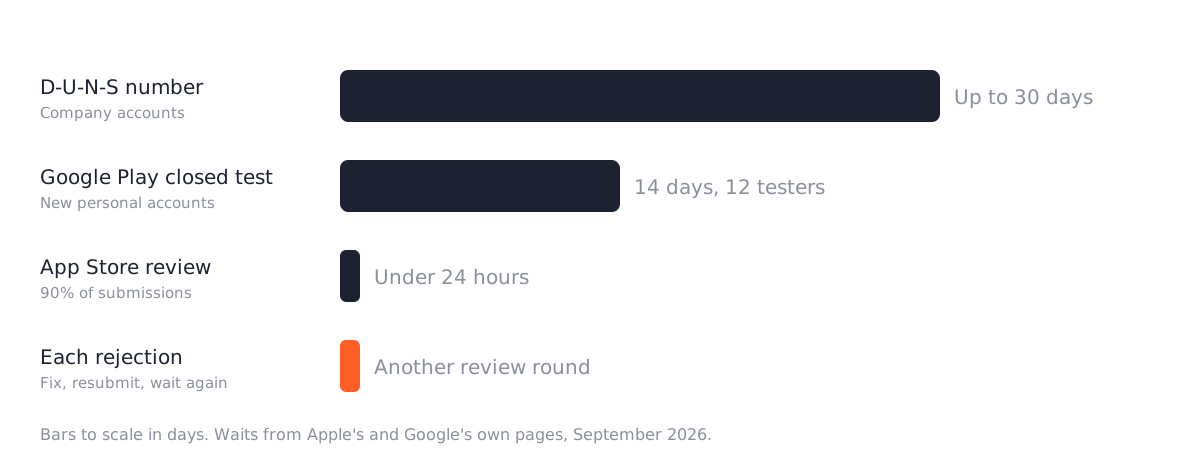
If the app goes out under a company name, both stores want a D-U-N-S number first. It’s a free business ID from Dun & Bradstreet, and Google warns it can take up to 30 days to arrive. So the app can be done in week four and still launch in week eight.
Publishing as a person skips that wait and gives you a different one. A Google Play account opened after November 13, 2023 has to run a closed test with at least 12 testers for 14 days in a row before it can publish to everyone. That’s twelve people with Android phones, keeping your app installed for two weeks.
One more thing while you set the accounts up: open them in your own name. An app published from a freelancer’s or an agency’s account stays there when you part ways, and moving it needs their help. We said the same about app builders, and it goes for us too.
Then the build won’t upload
You’d expect a working app to be an uploadable app. Not always.
Apple only accepts builds made with Xcode 26 and the iOS 26 SDK, a rule in place since April 28, 2026. Google Play only accepts new apps and updates that target Android 16, a rule in place since August 31, 2026, with an extension you can request to November 1.
Both stores raise these numbers every year. So an app last built in 2024 can run fine on your phone and still get refused at upload. On an older Flutter project, getting it to build on current tools can mean updating a pile of packages first.
That part is development work, not submission work. Ask about it before anyone quotes you for “just the submission”.
The forms want to know what’s inside your app
This is where most of the time goes, and it’s the part nobody warns you about.
Apple asks for App Privacy details on every new app and every update. What data does the app collect? Is it tied to the person? Is any of it used for tracking? The answers have to cover every third-party SDK in the app too: Firebase, the crash reporter, the payment library, the analytics one.
Google asks much the same in its Data safety form. Every app on a testing or production track fills it in, even one that collects nothing.
If you built the app, you can answer all of it in an afternoon. If someone else built it, you can’t, not honestly. Someone has to open the project, list every SDK, and check what each one sends and where. We think that list is the real work in a submission. The rest is typing.
Then there’s the delete button. If people can sign up inside the app, both stores want them able to delete the account inside it too. Google also wants a web page for deletion requests, for people who already removed the app. Sign-up with no way out gets rejected on both.
What comes back from review
Apple is quick. It says 90 percent of submissions are reviewed in under 24 hours. The catch is that every rejection puts you back in that line.
The missing demo account tops Apple’s own list. After that, these are the ones we’d check before pressing submit:
- The app crashes on the reviewer’s device.
- A placeholder image or dummy text is still sitting in a screen somewhere.
- The support link or the privacy policy link doesn’t load.
- A camera or location prompt doesn’t say why the app wants it.
- The screenshots show screens the app doesn’t have.
- The app is a website in a shell, which guideline 4.2 rejects.
Two more are easy to miss. If you offer Google or Facebook login, guideline 4.8 wants an equal option next to it that limits data to name and email and lets people hide their email. And screenshots come in fixed sizes, a 6.9 inch iPhone set plus a 13 inch iPad set if the app runs on iPad. Apple’s screenshot specs list them, and an image with transparency gets refused.
If you bought the app on CodeCanyon
Some apps start as a download. You find a delivery app on CodeCanyon, watch the demo, and buy the source code. The demo looked finished.
What lands in your downloads folder isn’t an app yet. It still needs a server, your branding, and two store listings.
The author won’t set any of that up, either. Envato’s item support policy covers questions and bugs for six months, and it says plainly that installation and custom changes aren’t included.
Check the license while the purchase is fresh. An Envato license covers one end product. If you planned to reskin the same code for three clients, that’s three licenses, and an app people pay for needs the Extended License instead.
Then the reskin. The app gets your name, icon and colors, but also its own package name and bundle ID, plus your own Firebase project and API keys in place of the demo’s. That last part is easy to skip, and it decides whose accounts your app actually runs on.
Apple is strict about template apps. Guideline 4.2.6 rejects an app made from a commercial template unless the business behind the content submits it. So it goes out under your developer account, not the freelancer’s. Anyone offering to publish it under theirs is signing you up for that rejection.
It also can’t look like the demo. Guideline 4.3 turns away near-identical apps, and Google’s spam policy says much the same. A delivery app with the demo’s screens and a new logo is the one we’d worry about.
And the older the code, the more of this post applies. Source written for an older Flutter release has to catch up with the build rules from earlier before it uploads at all, and Flutter’s list of breaking changes shows how far it has to go.
Do you need to pay someone for this?
Often, no. If you built the app, or the person who did still answers your messages, you can do every step here yourself. The fees are the only cost, and a rejection costs a day.
A service earns its fee on the other kind of app. The one a freelancer built and left. The one you bought as source code. The one with SDKs nobody has listed, in a project nobody has opened since the last Xcode release. That’s where the build rules and the forms pile up, and every guess on a form is a possible rejection.
Watch for two promises, though. A service can’t fix the app: a crash under guideline 2.1 is a code fix, and a good quote says which part is which. And nobody can promise approval. Review is Apple’s and Google’s call, and our own service agreement says so.
If you’d rather hand it over
Every app we build ships with the submission included, under your accounts. We take on apps we didn’t build too, CodeCanyon source code included, from $499 to install, reskin, publish or update. Pick App install, reskin or update on the contact form and you’ll have a fixed quote within 48 hours.
Once the app is live, the App care retainer keeps up with each year’s new rules, so your next update doesn’t stall at upload.
If you’re doing it yourself, go back to that Monday night. Before you press submit, add a working demo login to the review details in App Store Connect. It takes five minutes, and it saves you the Tuesday morning email.
Questions
How long does App Store review take?
Apple says 90 percent of submissions are reviewed in under 24 hours. The wait that hurts is the one after a rejection, because each fix goes back into the queue. On Google Play, a new personal account adds 14 days of closed testing before the first public release.
Can you publish an app I bought on CodeCanyon?
Yes. We install it, reskin it with your name, icon and colors, and publish it under your own developer accounts, which Apple's guideline 4.2.6 expects for apps built from a template. Check the license first: an Envato license covers one end product, so one purchase is one app.
Can a submission service guarantee approval?
No. Review is Apple's and Google's decision. A service can check the submission against Apple's list of common rejection reasons and reply to the reviewer when something comes back. A service that promises approval is promising something it does not control.
Read these next
Same kind of problem, different corner of the store.
App builder vs custom Flutter app: the 24-month cost
Tapcart, Shopney, MobiLoud and AppMySite against a custom Flutter build, with the arithmetic over two years and the four cases where the builder wins.
Mobile apps
An Astro storefront with Shopify or WooCommerce behind it
Astro builds the pages, Shopify or WooCommerce keeps products, cart and checkout. When that split pays off, and which apps and plugins stop working.
Websites
Astro vs WordPress for a small business website
Astro suits most small business sites and handles bookings and logins with a database. Speed, security, editing, upkeep, and where WordPress keeps an edge.
Websites