App builder vs custom Flutter app: the 24-month cost
Tapcart, Shopney, MobiLoud and AppMySite against a custom Flutter build, with the arithmetic over two years and the four cases where the builder wins.
Take a beauty store doing 3,000 orders a month, 26 months into an app builder subscription. The subscription has cost more than a custom build would have, the store owns nothing, and the feature they want most, a routine reminder with push, is on the builder’s list of planned features with no date.
That is the common shape of the question, and the honest answer is that staying on the builder for the first year was right. The arithmetic decides when to switch, and it is simpler than either side makes it sound.
TLDR
App builders cost $100 to $1,250 a month and give you a standard store app in days. A custom Flutter app costs from $9,000 once plus $300 to $500 a month to keep current. Over 24 months a builder at $600 a month costs $14,400 and a custom app about $18,600. A builder at $1,000 a month costs $24,000, and the custom app is cheaper from month 15. The break-even tier is around $800 a month. The builder wins for the first year, for stores under about 1,000 orders a month, and for anyone who wants an app without a project. Custom wins when the app needs something the builder does not have, or when you want to stop renting.
What the builders are
Tapcart and Shopney are Shopify app builders: install the app, pick a template, connect the catalog, publish. MobiLoud wraps the mobile site in a native shell and works with WooCommerce and Shopify. AppMySite is the WooCommerce native option at the low end. All four publish to both stores, all four handle push, and all four charge monthly for as long as the app exists.
Prices at the time of writing run from around $100 a month at the low end to over $1,000 a month for the plans with the features a growing store wants: customer segments for push, product recommendations, a native checkout rather than a web view. Some charge a percentage of app revenue on top. Check the current pricing page, because the tiers move every year.
What you get for that is real: an app in a week, someone else dealing with App Store review, and updates when iOS changes. What you do not get is the code, the push infrastructure, or any feature that is not on their list.
The arithmetic
The custom side has two numbers. The build, from $9,000 for a store app with catalog, cart, native checkout, accounts, push and the store submission. And the upkeep, $300 to $500 a month on an App care retainer for OS updates, API changes and resubmissions, or nothing if you have a developer in house.
| Builder at $300/mo | Builder at $600/mo | Builder at $1,000/mo | Custom Flutter | |
|---|---|---|---|---|
| Month 1 to 12 | $3,600 | $7,200 | $12,000 | $9,000 + $4,800 |
| Month 13 to 24 | $3,600 | $7,200 | $12,000 | $4,800 |
| 24-month total | $7,200 | $14,400 | $24,000 | $18,600 |
| 36-month total | $10,800 | $21,600 | $36,000 | $23,400 |
| You own at the end | Nothing | Nothing | Nothing | The app |
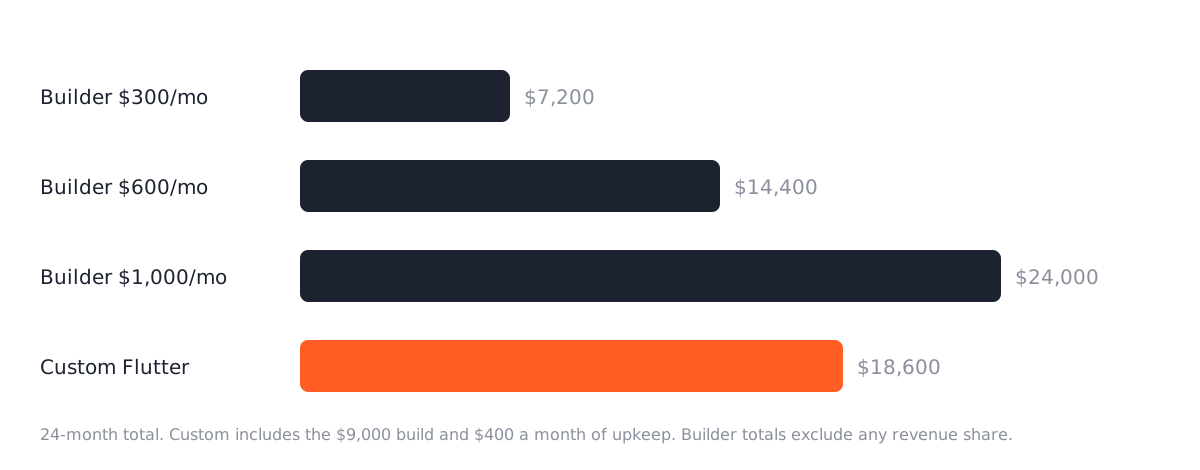
At $300 a month the builder is cheaper for years. At $600 the lines cross around month 45, so only a store planning on the app for four years comes out ahead with custom. At $1,000 the custom app is cheaper from month 15, and by year three it has saved more than a year of builder fees. The tier where two years is the break-even is around $800 a month, which is where the plans with segmented push and a native checkout tend to sit.
The table is fair to the builder in one way and unfair in another. Fair: it uses our lowest custom price. A store app with loyalty, subscriptions and a custom design is $18,000 to $35,000, and that moves every crossing point out by a year. Unfair: it ignores the revenue share some builders take, and it ignores that the builder’s $1,000 tier is where the features a 3,000-order store needs actually live.
When the builder is the right buy
Four cases, and they cover most stores asking.
The first year. An app is a guess about whether your customers will install one. A builder answers the question for a few thousand dollars. If a year in the app is doing 15 percent of orders, you know it is worth building properly. If it is doing 2 percent, you saved $9,000.
Under about 1,000 orders a month. Below that, the app will not carry enough volume for ownership to matter, and the builder’s monthly fee is proportionate to the revenue.
A standard store. Catalog, cart, checkout, push, order tracking. If that is the whole list, the builder’s template does it and a custom app would do the same thing for more money.
No appetite for a project. A custom build is four to six weeks of decisions, screens to approve, a test build to try. A builder is an afternoon. Some store owners want the afternoon, and that is a legitimate reason.
When custom wins
The feature is not on the list. The beauty store’s routine reminder. A configurator. Offline mode for a trade counter app. A loyalty program that is not the builder’s loyalty partner. Scan-to-order for wholesale customers. Anything the builder lists as planned.
The checkout has logic. Builders use Shopify’s checkout or a web view of WooCommerce’s, which is fine until the store has the pricing rules from the B2B guide or custom checkout fields. A custom app talks to the store’s API and shows the checkout the store actually has.
Push is a product. Builders meter push by plan. A custom app on your own Firebase project sends as many as you like to whatever segments you define, at no per-message cost, and the segments come from your store data rather than the builder’s.
You want out of the subscription. This is the beauty store’s case. 26 months at $700 is $18,200 with nothing to show. A custom app with a loyalty integration is around $12,000, and it is theirs.
There is no store behind the app. A booking app, a membership app, a delivery app for a restaurant group. Builders assume a catalog. A custom app with its own Laravel backend does not, and that is the other half of mobile app development.
What a custom build includes
Because the builder’s price includes things people forget to price into custom: the App Store and Play submission, listing copy and screenshots, privacy forms, the review replies. Ours includes those, under your developer accounts, so the listing is yours. It includes push on your own Firebase project. It includes the source in your repository from the first commit and a document that explains how to build it, so a different developer could take it over.
It does not include the things a builder also does not include: the design system if you want one beyond the store’s brand, loyalty, subscriptions, and the second year of iOS changes, which is the retainer.
What to ask a builder before signing
If the arithmetic says builder for now, five questions decide how expensive the eventual switch will be. Ask them in writing before the subscription starts.
Who owns the App Store and Google Play listings? The right answer is that the app is published under your developer accounts, so the listing, the reviews and the install base stay with you when you leave. Some builders publish under their own accounts, and leaving means a new listing with zero reviews and a new install for every customer.
Is the checkout native or a web view? A web view shows the store’s mobile checkout inside the app. It works, and it means every checkout customization on the store applies. A native checkout is faster and supports Apple Pay properly, and it means the builder’s checkout, not yours.
What happens to push subscribers when you leave? Push tokens are tied to the app. If the listing stays yours and the new app ships under the same bundle identifier, customers get the update and keep receiving push. If not, the subscriber list is gone.
Is there a revenue share, and on what? A percentage of app revenue on top of the subscription changes the arithmetic above by a lot at 3,000 orders a month. Get the number and the definition of “app revenue”.
Can you export anything? Usually the answer is no, and that is fine as long as you know it. The store data was never in the builder anyway.
A builder that answers all five well is a fine place to spend the first year. A builder that publishes under its own account and takes a revenue share is a place to leave sooner.
Deciding
Add up what you have paid the builder so far and what the next 24 months cost on the tier you actually need. Compare it to $9,000 plus 24 months of upkeep. Then ask whether there is a feature on your wish list the builder does not have. If the numbers are close and the wish list is empty, stay. If the numbers favor custom or the list has one thing on it that matters, build.
For the beauty store the arithmetic says build, and the 26 months on the builder were not wasted. They were the proof that an app was worth building.
Questions
Can we start with a builder and move to custom later?
Yes, and many stores should. Nothing from the builder carries over except what you learned about which features customers use. The app store listing can be kept if the builder published under your developer account, so insist on that from day one.
Flutter or native?
Flutter for one codebase and one budget covering iOS and Android. Native Swift when the app leans on iOS features or the feel of the app is the product. The quote names which and why.
Read these next
Same kind of problem, different corner of the store.
What an app store submission service handles
Your app works, and Apple still sent it back. The accounts, build rules, privacy forms and review replies between a finished app, or one bought as source code, and a live listing.
Mobile apps
An Astro storefront with Shopify or WooCommerce behind it
Astro builds the pages, Shopify or WooCommerce keeps products, cart and checkout. When that split pays off, and which apps and plugins stop working.
Websites
Astro vs WordPress for a small business website
Astro suits most small business sites and handles bookings and logins with a database. Speed, security, editing, upkeep, and where WordPress keeps an edge.
Websites