Shipping rates by category, postcode and customer group
Table rate plugins handle weight and zones. They stop at rules that depend on two things at once. Where each plugin ends, and what a custom method costs.

Take a garden supplies store with a shipping spreadsheet. Bulky items by category, an extra charge for the Scottish islands and Northern Ireland, free delivery for trade accounts over £300, and a carrier quote with a fifteen percent markup for anything over 30 kilograms. Four rules. A store like this usually has three plugins installed to express them, none of which can do all four, and a trade customer somewhere being charged the wrong rate.
That spreadsheet is what most WooCommerce shipping problems look like. The rules are not complicated. They just depend on two things at once, and shipping plugins are built around one.
TLDR
WooCommerce shipping classes and table rate plugins handle rates by weight, price and zone, and shipping by product category works through classes. They stop at rules that combine two dimensions, such as category and postcode, or weight and customer group, and at carrier quotes with a markup. Those rules are one custom shipping method, written as code, from $1,500.
What WooCommerce does on its own
Three things, and they cover more stores than people expect.
Shipping zones group destinations by country, state or postcode range, and each zone gets its own methods. A postcode in the zone list can be a numeric range like 90210…99000, or a wildcard like BT* and IV*, which is how you charge more for Northern Ireland and the Highlands without a plugin. The doc is specific that wildcards inside a numeric range are not supported.
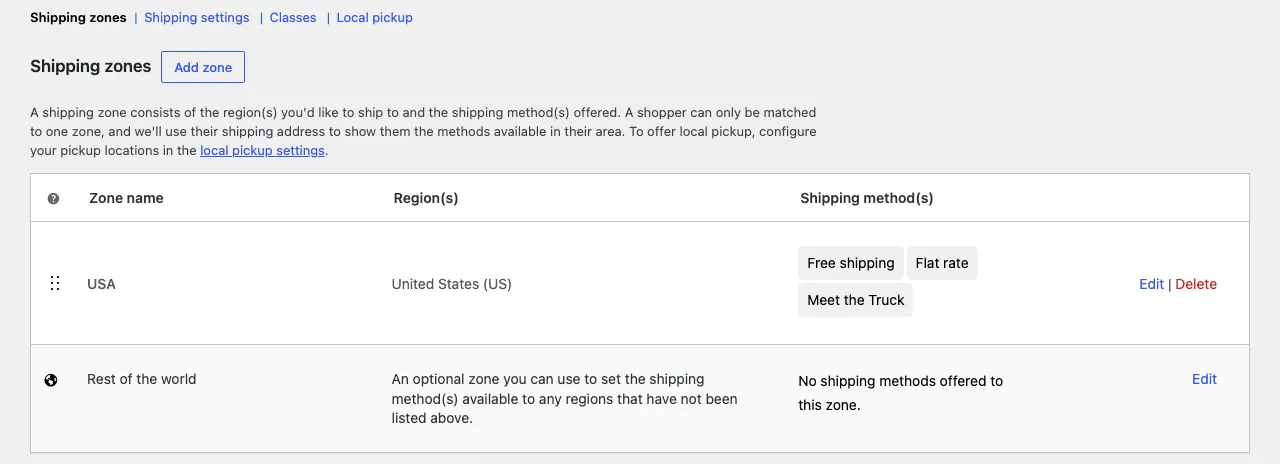
Shipping classes tag products, and the flat rate method can charge a different amount per class. Put every product in the “Bulky” category into a Bulky shipping class, set the flat rate to add £12 per Bulky item, and shipping by category is done.
Free shipping has a minimum order amount and can require a coupon. That covers “free over £50” for everyone.
The store in the opening paragraph could have done two of its four rules with nothing installed. Bulky by category is a shipping class. Islands surcharge is a zone with postcode wildcards. That is worth knowing before buying anything, because every plugin adds a place for a rule to hide.
Where the plugins go
The two rules that WooCommerce cannot do alone are the ones that combine dimensions: free for trade accounts over a threshold, and a carrier quote with markup above a weight. This is where table rate plugins come in, and where they stop.
| Plugin | What it adds | Where it stops |
|---|---|---|
| Table Rate Shipping (WooCommerce, $119 a year) | Rate tables by weight, price, item count and item count by class, per zone | One table per zone, conditions combine within a row but cannot reference the customer |
| Flexible Shipping (Octolize) | Rules by weight, price, item count, class, and in the paid version by category, product and user role | Carrier API quotes need a separate paid add-on per carrier; markup on a live quote is not a rule |
| Conditional Shipping and Payments | Hides or shows methods by cart contents, customer, destination | Restricts methods. Does not calculate rates |
| Advanced Shipping Packages | Splits a cart into packages by class or category so each ships separately | Splitting, not pricing |
Flexible Shipping Pro gets closest. A rule can say “user role is wholesale AND cart total over £300, cost 0”. The garden store’s third rule fits. The fourth, a live carrier quote plus fifteen percent, does not fit any of them, because a markup on a quote is arithmetic on a value the plugin fetched, and the rule engines work on cart facts, not on fetched values.
The other place plugins stop is the interaction between them. Each plugin registers its own shipping method. Two methods from two plugins both show at checkout, and the store owner ends up hiding one with a third plugin. The customer sees the right rate, the admin sees a stack that nobody wants to touch.
Rules plugins cannot express
The rules that end up as custom code, in the order they come up:
- A rate by category and postcode together. Bulky items to mainland at one price, bulky items to islands at another, small items free to both. Shipping classes give the category, zones give the postcode, but a class rate does not vary by zone unless every zone gets its own table, and then a change means editing six tables.
- Weight bands that depend on the customer group. Retail pays by weight, trade pays a flat £8, distributors pay nothing. The customer group is a role, a tag, or a field from the ERP, and only the last one is a problem for plugins.
- A carrier API quote with a markup, a minimum, or a cap. Royal Mail, DHL or a courier aggregator returns a live price, the store adds a percentage, rounds to the nearest 50p, and never charges less than £4.95.
- Per-item rates from a product field. A pallet fee set on the product itself, added once per pallet, not per unit.
- A delivery date rule. Next-day delivery shown only before 2pm, only to postcodes the courier reaches next day, only when everything in the cart is in stock.
- A quantity break. The first item costs £6 to ship, each extra item £1, but never more than £15. Table rate plugins do per-item or per-order, not a curve.
None of these is unusual. Each of them is a few lines of logic. The gap is that the logic references something a rules engine does not have a field for.
What a custom shipping method looks like
WooCommerce lets a plugin register a shipping method by extending WC_Shipping_Method. The method gets the cart package, which includes the destination, the items with their products, and the customer, and it adds one or more rates. Everything else is the rules, written once, in code you can read.
A trimmed version of the trade-account rule from the garden store:
class Trade_Shipping extends WC_Shipping_Method {
    public function __construct( $instance_id = 0 ) {
        $this->id                 = 'trade_shipping';
        $this->instance_id        = absint( $instance_id );
        $this->method_title       = 'Trade delivery';
        $this->supports           = array( 'shipping-zones' );
        $this->init_settings();
    }

    public function calculate_shipping( $package = array() ) {
        $user  = wp_get_current_user();
        $total = WC()->cart->get_subtotal();

        if ( in_array( 'trade', (array) $user->roles, true ) && $total >= 300 ) {
            $this->add_rate( array( 'id' => $this->get_rate_id(), 'label' => 'Trade delivery, free over £300', 'cost' => 0 ) );
            return;
        }

        $this->add_rate( array( 'id' => $this->get_rate_id(), 'label' => 'Trade delivery', 'cost' => 8 ) );
    }
}
The full plugin has the bulky rule, the islands surcharge and the carrier call in the same class, with the carrier quote cached for ten minutes so the checkout does not call the API on every address keystroke. It ships with PHPUnit tests for each rule, so when the store changes the threshold from £300 to £350 next year, the test tells them nothing else moved. This goes in a plugin of its own, never in the theme’s functions.php, so a theme update cannot take the shipping rules with it.
The method appears in the zone settings like any other. The store owner adds it to the UK zone, removes the three plugins, and the checkout shows one rate with the right number.
When we say buy the plugin
Most stores. If your rules are weight, price, zone and class, Table Rate Shipping at $119 a year or Flexible Shipping is the answer, and the quote says so. Custom code for a rule a plugin handles is money spent on maintenance you did not need.
The test is the spreadsheet. Write every shipping rule as a row with the condition and the price. If every row uses at most one of weight, price, count, class and zone, a plugin will do. If a row uses two, or references a customer field, a product field, a date or an API, that row is custom, and it is usually cheaper to do the whole method as custom than to run one plugin for the easy rows and code for the hard one.
What it costs
One custom shipping method with rules like the ones above: a feature sprint from $1,500, ten business days, tests and documentation included. A carrier API integration with markup adds two or three days for the carrier’s authentication and the caching. Rules that depend on a field from an ERP or a price list belong with the WooCommerce plugins and checkout logic we build, and often go in the same plugin as the pricing rules, because the same customer group drives both.
The garden store’s spreadsheet becomes one method, one plugin, around forty lines of rules and a test per rule. The wrong trade rate stops the day it goes live. The credit notes for the previous year are the accountant’s job, and that is the cost of expressing four rules with three tools.
Questions
Can WooCommerce do shipping by product category without a plugin?
Only through shipping classes. Assign a class to the products in the category, then give the flat rate method a cost per class. It works for one dimension. It cannot combine the class with the postcode or the customer.
What does a custom shipping method cost?
A single method with the rules written as code, tested and documented, is a feature sprint from $1,500 and takes about ten business days. Carrier API quotes with markup add a few days.
Read these next
Same kind of problem, different corner of the store.

Block theme or page builder for a new WooCommerce store
Page builders are how most WooCommerce stores got slow. A block theme keeps the layout in the editor WordPress already has. Where each one wins.
WooCommerce
Check old plugins for HPOS before an update breaks the store
HPOS moved orders out of the posts table. Old plugins that read orders as posts fail without an error. How to find them and what a fix involves.
WooCommerce
Add custom fields to the WooCommerce block checkout
The old checkout field filters do nothing on the block checkout. The Additional Checkout Fields API does. Code, limits, and when to go further.
WooCommerce