WooCommerce to NetSuite: connector or custom sync?
The official connector, Celigo and a custom sync all move orders and stock. Which fits depends on item types, subsidiaries and mapping.
Every WooCommerce to NetSuite conversation starts the same way: “we tried the connector and it does most of it”. Most of it. The part it did not do is why the conversation is happening, and it is usually one of four things: matrix items, kit items, a second subsidiary, or a custom field the finance team needs on every sales order.
NetSuite is the ERP most mid-size WooCommerce stores end up on, and it is the one where the choice between a connector and custom code is a real choice with a real price on each side. This is the decision table we use in quotes.
TLDR
Use a connector when your NetSuite items are standard inventory items, one subsidiary, and the order fields you need are the ones on a NetSuite sales order by default. Go custom when items are matrix or kits, when there is more than one subsidiary or currency, when finance needs custom fields, or when the sync has to do something on a schedule that is not “when an order is placed”. Custom two-way sync starts at $4,500 fixed.
What every option moves
The four flows are the same whichever tool does them:
- Orders out. A paid WooCommerce order becomes a NetSuite sales order with the customer, the lines, the shipping and the tax.
- Customers out. A new WooCommerce customer becomes a NetSuite customer record, or matches an existing one by email.
- Stock in. NetSuite item quantities update WooCommerce stock, on a schedule or on change.
- Fulfilment and prices in. Tracking numbers come back to the order; price changes in NetSuite reach the product.
Refunds, partial shipments and cancellations are the fifth flow, and every tool handles them differently. Ask about refunds first when evaluating anything.
The connectors
NetSuite Integration for WooCommerce on the WooCommerce Marketplace does the four flows for standard items and one subsidiary. It runs inside WordPress, which means the sync runs when WordPress runs, and a busy store with a slow host can see orders queue.
Celigo is an integration platform with a prebuilt WooCommerce to NetSuite flow. It runs outside both systems, handles more field mapping through its interface, and is priced for companies where a few thousand dollars a month is not the question. For a $2 million a year store it usually is the question.
Agency connectors from Folio3, WebBee and others sit between: a licensed product plus setup hours. They tend to be built for one vertical, and the fit depends on whether your store looks like the one they built it for.
All of them are right for a store whose NetSuite setup is standard. A single subsidiary, inventory items with SKUs that match WooCommerce SKUs, prices in one currency, a sales order with the default fields. That describes a lot of stores, and for them a connector at $100 to $500 a month with a day of setup is the answer. We say so in the quote when it is.
Where connectors stop
| Situation | Connector | Why |
|---|---|---|
| Matrix items (parent with size and color children) | Partial | Children map if the SKUs line up. Parent-level data such as images and descriptions often does not |
| Kit and assembly items | Usually no | A kit sells as one line in WooCommerce and consumes several items in NetSuite. Connectors send one line and the stock is wrong |
| More than one subsidiary | Rarely | The order has to land in the right subsidiary based on the customer’s country or the store, with the right currency |
| Custom fields on the sales order | Sometimes, with a consultant | A PO number, a sales rep, a marketing source. Each is a mapping the connector may or may not expose |
| Price levels and customer-specific pricing | No | NetSuite price levels driving WooCommerce prices per customer group is a two-way flow the connectors do not attempt |
| Refunds and partial returns | Varies | Some create credit memos, some create a note, some do nothing |
| Scheduled jobs that are not order-driven | No | A nightly reconciliation, a monthly export, a stock sync for one warehouse only |
The row that comes up most is kits. A store selling a “starter bundle” as one product, with NetSuite tracking the four items inside it, will show wrong stock within a week of turning on a connector that does not understand kits. The fix in the connector is a consultant mapping the kit to its components, if the connector allows it, billed hourly, repeated for every new bundle.
What custom looks like
A small service, in Laravel or Node, that talks to WooCommerce through its REST API and to NetSuite through SuiteTalk or a RESTlet, with the mapping written as code and the runs logged where you can read them. It runs where you want, on a schedule you set, and it does exactly the flows you have.
For the kit case, the service explodes the bundle into its components on the way to NetSuite, using a mapping stored in one place, and the stock flow the other way computes the bundle’s available quantity as the minimum across components. Twenty lines of logic, and the stock is right.
For the subsidiary case, the service reads the customer’s country and the store’s currency, picks the subsidiary, and creates the sales order there. A second store on the same WooCommerce install, in a second currency, is a configuration line, not a second connector.
For custom fields, the mapping is a table in the code: WooCommerce order meta key on the left, NetSuite field ID on the right. The PO number from the block checkout field lands on the sales order because a line in that table says so.
The part people underestimate is the retries. NetSuite’s API has concurrency limits and goes away for maintenance. A custom sync queues every job, retries with backoff, and alerts when a job fails three times, with the payload in the log so the failure can be replayed. The connector’s version of this is an email that says “sync failed” with no way to replay.
Two scenarios
Take a lab supplies distributor, WooCommerce with 8,000 SKUs, NetSuite with matrix items and three price levels. Run the official connector and orders sync, but stock is wrong for every matrix parent, and trade customers on a NetSuite price level see retail prices on the store. The custom build would be a nightly price-level sync into WooCommerce customer group prices, a stock sync that understands the matrix, and the order flow moved off the connector so one system writes orders. Around six weeks at a fixed price, and the connector subscription can end the month after.
Now take a furniture brand, one subsidiary, standard inventory items, standard sales orders. That store should be quoted the connector even if it asks for custom. One setup day, and years without a developer. Custom would be $8,000 it did not need to spend.
Questions for a connector vendor
Whether it is the official connector, Celigo or an agency product, the same six questions in the sales call save a year of finding out:
- Show me a kit item syncing. Not a slide, a demo store.
- What happens to an order placed while NetSuite is down for maintenance? Where does it wait, and who is told?
- How do I map a custom field on the sales order, and do I need you to do it?
- What does a refund do in NetSuite? A credit memo, a note, or nothing?
- Where do I see the last hundred sync jobs and their errors?
- What is the price at twice my current order volume?
The answers to two and five are the difference between a connector you can run yourself and one that needs a support ticket every time something goes wrong.
How a custom sync is run
The reason to write the mapping as code is the same reason to run it as a service you can see into. A custom sync as we build it has four operational parts, and each one is a thing the connector question list above asks about.
A queue. Every event, an order paid in WooCommerce, a stock change in NetSuite, a price update, becomes a job. Jobs run in order and are retried with increasing delays when NetSuite refuses them, which it does, several times a day, for concurrency and maintenance reasons.
A log you can read. Each job records what it sent, what came back, and how long it took, in a table with a search box. When finance asks why order 10482 is not in NetSuite, the answer is on one screen.
Alerts. A job that fails three times sends an email with the payload and a link to replay it after the cause is fixed. Silence means everything is syncing; a store owner should never learn about a sync problem from the accountant.
A reconciliation. Once a night, the service compares the day’s paid orders in WooCommerce with the day’s sales orders in NetSuite and lists any that are on one side only. This catches the failure mode no event-driven sync catches: the event that never fired.
All of it runs on a small server, yours or ours, for a few dollars a month, and the code is in your repository. The custom ecommerce solutions page lists it as monitoring and retries, which undersells how often it is the reason a sync is trusted.
The decision, in one pass
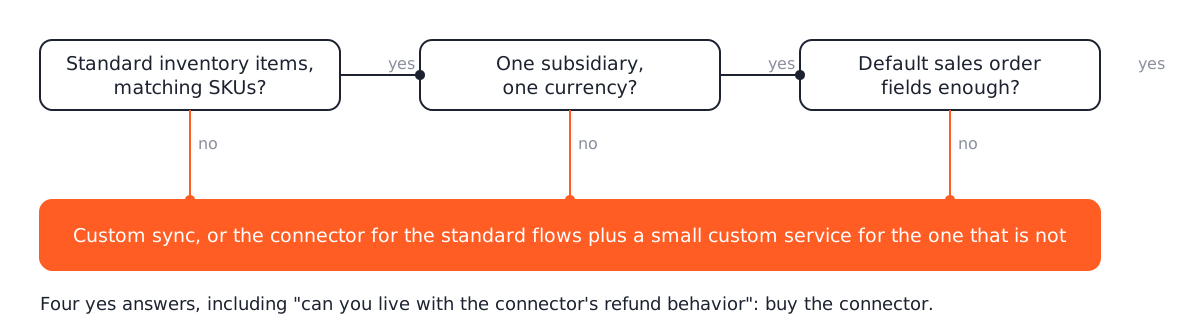
Answer four questions. Are all your items standard inventory items with matching SKUs? Is there one subsidiary and one currency? Are the fields finance needs on the sales order the default ones? Can you live with the connector’s refund behavior?
Four yes answers: buy the connector. Any no: get a quote for custom, and expect the quote to name the one flow that forces it, because often the right build is the connector for the standard flows and a small custom service for the one that is not.
Custom two-way sync starts at $4,500 as a fixed build and is listed under custom ecommerce solutions. The quote begins with the four questions above, and the answer is sometimes “keep the connector”. That answer is free.
Questions
Which is cheaper over three years?
A connector at a few hundred dollars a month is cheaper than custom for a store with standard mapping. Custom is cheaper the moment the connector needs a consultant to bend it, because that is billed by the hour and it never ends.
Can custom sync run alongside the connector?
Yes, and it often does: the connector for orders and customers, a small custom service for the one thing it cannot do, such as kit items or a second subsidiary. Two systems writing the same record is the thing to avoid.
Read these next
Same kind of problem, different corner of the store.

App builder vs custom Flutter app: the 24-month cost
Tapcart, Shopney, MobiLoud and AppMySite against a custom Flutter build, with the arithmetic over two years and the four cases where the builder wins.
Mobile apps
An Astro storefront with Shopify or WooCommerce behind it
Astro builds the pages, Shopify or WooCommerce keeps products, cart and checkout. When that split pays off, and which apps and plugins stop working.
Websites
Astro vs WordPress for a small business website
Astro suits most small business sites and handles bookings and logins with a database. Speed, security, editing, upkeep, and where WordPress keeps an edge.
Websites